Article 06
How a System-Audio Visualizer Works on macOS
A system-audio visualizer does not need to identify your song. It needs a short-lived signal, a small set of measurements and a renderer that can turn those measurements into motion before the next frame.
Short answer
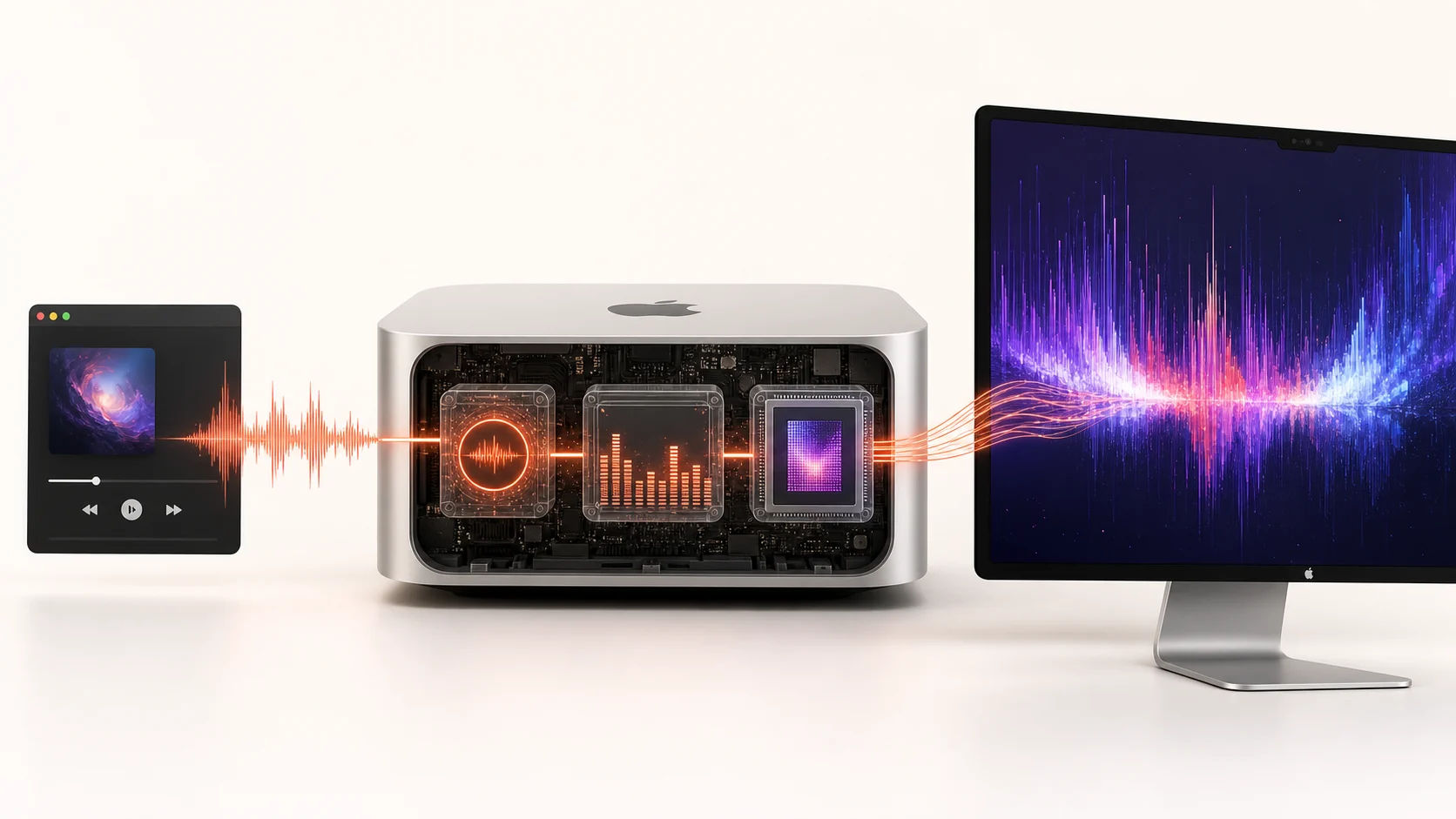
On modern macOS, an app can use Core Audio’s process-tap system to receive audio for local processing. The visualizer extracts features, discards the raw working signal and sends only control values into the renderer.
The signal path in five boxes
- Player
Spotify, Apple Music, a browser or another app produces sound.
- macOS audio system
Core Audio routes the output and, with permission, exposes a tap for processing.
- Local analyzer
A short window of samples becomes values such as overall energy and frequency-band energy.
- Scene logic
Those values influence speed, scale, color, displacement or particle behavior.
- Metal renderer
The GPU draws the current scene to the selected display mode.
Why the analyzer uses windows, not whole songs
A reactive frame only needs recent sound. The analyzer looks at a small moving window so the visual can respond quickly, then advances to the next window. It does not need a song-length recording to know that a bass hit just happened.
Different smoothing values create different personalities. Too little smoothing looks nervous; too much feels late. Scene design is partly the art of deciding which frequencies matter and how quickly each visual property should forget them.
What the renderer receives
The renderer does not need lyrics, an artist name or the original audio file. It can work with compact control values: energy is high, low frequencies are rising, the transient level just peaked. Those numbers change geometry without revealing what track produced them.
Metal provides direct access to Apple-platform GPUs, which is why it fits a frame-by-frame macOS visual engine. The GPU handles parallel drawing while the audio side stays focused on timely analysis.
What can go wrong
- Permission is denied or changed after installation.
- The selected output device changes and the audio route must be rebuilt.
- The analyzer runs too slowly and motion falls behind the sound.
- The scene asks the GPU for more work than the display budget allows.
- A sleep, display or full-screen transition is not handled cleanly.
Permission is part of the route, not the artwork
macOS controls whether an app can receive the audio signal needed for analysis. The app should request that access at the moment the feature needs it and explain the result of refusing. A wallpaper can still display a static or idle scene without audio, but it cannot honestly claim live sound response without a usable signal.
Permission changes can require the route or the app to restart. If the user grants access after the first launch, rebuilding the audio connection is more reliable than assuming the old connection has changed underneath it. The visual layer should display a clear inactive state instead of silently showing motion that looks reactive but is not.
The audio route is independent from the purchase license. Activation proves that the user is entitled to the app; it does not grant a macOS privacy permission. Keeping these layers separate makes failures easier to understand and avoids treating data access as a condition of payment.
From samples to visual controls
Digital audio arrives as a stream of sample values. A visualizer groups a short run of samples into a window and calculates useful features. Overall energy can drive broad intensity. Frequency-band energy can separate bass from midrange and high-frequency detail. A transient detector can find sudden changes that deserve a sharper response.
These values are then normalized so a quiet recording and a loud master do not produce completely unrelated ranges. Smoothing decides how quickly a visual property follows a rising value and how slowly it returns. Each scene can map the same analyzer output differently, which is why one signal can create a calm surface in one scene and a particle burst in another.
The renderer only needs the latest compact state. It does not need a database of previous songs. The raw analysis window can be released after its features have been calculated, while the scene keeps only the state required for visual continuity.
Latency is a budget shared by several steps
The visual response is delayed by audio buffering, the analysis window, smoothing, scene simulation and the next display refresh. Reducing one delay too aggressively can create instability elsewhere. A tiny analysis window reacts quickly but gives weaker frequency resolution. No smoothing feels fast but can flicker.
Good tuning minimizes unnecessary delay and uses the remaining delay intentionally. A large structural motion can trail a beat slightly and still feel natural, while a flash attached to a snare needs a faster path. There is no single latency number that describes every property in a scene.
If a whole scene feels late, first reduce analysis or smoothing delay. If only one effect feels late, adjust that mapping rather than destabilizing the entire pipeline. This is why scene design and audio engineering cannot be separated completely.
Recovery matters as much as first connection
Real Mac sessions include AirPods, docks, screen sharing, sleep, wake and displays that disappear. Each change can alter the audio or render route. A robust visualizer watches for state changes, releases stale resources and rebuilds only the affected layer.
The user should not have to reinstall the app to recover. A visible reconnect action, a default scene and a clear permission message are better than guessing. Logs can record technical errors without recording raw audio. That gives support enough information to diagnose a route failure while preserving the boundary of the audio feature.
Frequently asked questions
Does system-audio analysis record a whole song?
It does not need to. A reactive visual can analyze short moving windows, derive current control values and release the raw samples after use. Storage is a separate product decision.
Why use frequency bands instead of volume alone?
Overall volume can only make everything stronger or weaker. Frequency bands let low, middle and high parts of the sound influence different visual properties.
Why can the visual stop after changing headphones?
The active output route may have changed. The app needs to observe that change and rebuild or reconnect its audio path.
Does the renderer know which app is playing?
Not necessarily. A system-output route can react to the combined sound without identifying Spotify, a browser or another player.